Is there a way to copy all the attribute content from one object to another object. I can copy the object, but when pasted an new object is created and I only want to modify the exisiting object.
|
Re: Copy attributes from one object to another. I know a way, but it's not as easy as it looks. Are the objects within the same module? If not, you must first ensure that concerned attributes exist on both sides, or at least you must point out the attribute(s) value(s) you want to copy. Then, you should use a "for attribute in module" loop (refer to the DXL user manual), eventually inside a "for object in module" loop. As always, it depends on what you're trying to achieve. Give more details if you need a more precise answer. Cheers. |
Re: Copy attributes from one object to another. jdoucement - Wed Apr 13 10:54:21 EDT 2011 |
Re: Copy attributes from one object to another. Let me scribble, debug it yourself:
void  CopyAllAttrValues(Object oFrom, oTo, bool IgnoreHeadingText)
{    // Copy all attribute values from the "oFrom" object to the "oTo" object.
     // Optionally don't copy Object Heading nor Object Text
     // Ignore write errors
     // Do NOT erase oTo values that oFrom doesn't have, such as when they
     //    are in different modules with different attributes.

     if (null oFrom or null oTo) return

     AttrDef ad
     string NameAttr
     for ad in module(oFrom) do
     {  if (!ad.object)  continue     // This attr isn't for objects  (e.g. "Prefix")
        if (!ad.useraccess) continue  // you may not modify this attr (e.g. "Last Modified On")
        NameAttr = ad.name
        if (IgnoreHeadingText      and
            (NameAttr == "Object Heading" or NameAttr == "Object Text")) continue
        noError()
        set(oTo.NameAttr, oFrom.NameAttr)
        lastError()
     }
}
|
Re: Copy attributes from one object to another. llandale - Wed Apr 13 15:33:42 EDT 2011 Let me scribble, debug it yourself:
void  CopyAllAttrValues(Object oFrom, oTo, bool IgnoreHeadingText)
{    // Copy all attribute values from the "oFrom" object to the "oTo" object.
     // Optionally don't copy Object Heading nor Object Text
     // Ignore write errors
     // Do NOT erase oTo values that oFrom doesn't have, such as when they
     //    are in different modules with different attributes.

     if (null oFrom or null oTo) return

     AttrDef ad
     string NameAttr
     for ad in module(oFrom) do
     {  if (!ad.object)  continue     // This attr isn't for objects  (e.g. "Prefix")
        if (!ad.useraccess) continue  // you may not modify this attr (e.g. "Last Modified On")
        NameAttr = ad.name
        if (IgnoreHeadingText      and
            (NameAttr == "Object Heading" or NameAttr == "Object Text")) continue
        noError()
        set(oTo.NameAttr, oFrom.NameAttr)
        lastError()
     }
}
|
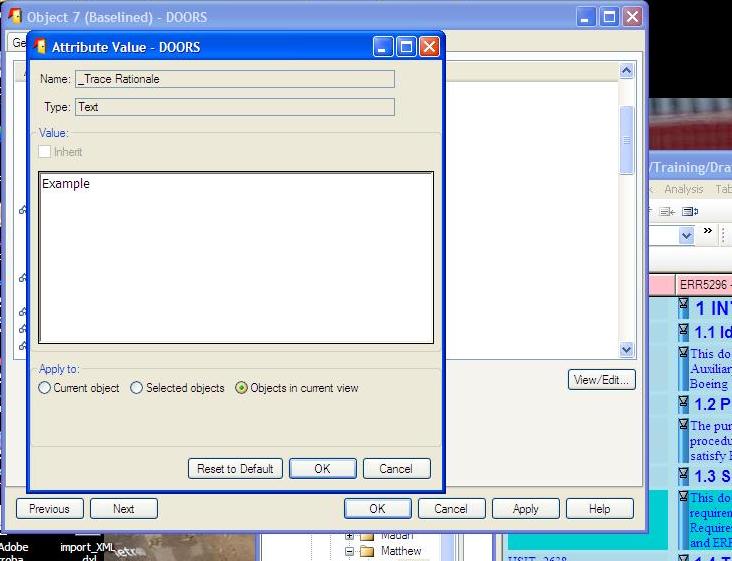
Re: Copy attributes from one object to another. 1. In case, if all the objects in the module should be updated with the same attribute text, then select any object and fill in the text. After filling in the data for the attribute, there will be an radio buttons to fill the same text for the attribute in current module. 2. In case, if a selected objects in the module should be updated with the same attribute text, then apply filter over the module. After performing the filter, fill in the attribute with the new text and select the radio button. Select the radio button to fill in the same data in the current view. |
Re: Copy attributes from one object to another. Lion29 - Wed Apr 13 20:12:18 EDT 2011 |
Re: Copy attributes from one object to another. lahines - Thu Apr 14 06:59:30 EDT 2011 1. right click over the object and goto properties. 2. Fill the Attribute Value in the text box. 3. In the "Apply to", select "Objects in current view" 4. Then Click OK. Perform the same for each of the attribute. Attachments attachment_14606706_untitled.JPG |